Microsoft Foundry Hosted Agents - What, Why, Protocols & Your First Deployment
Introduction to Foundry Hosted Agents - understanding the platform, protocols, SDK layers, and deploying your first agent.
Building agentic applications is exciting — until you realize you also need to solve containerization, web servers, identity, state persistence, scaling, and observability before your agent can say “Hello.” You just want to write agent logic, not plumb infrastructure. That’s the problem that my team has solved with the launch of Microsoft Foundry Hosted Agents: you write the code, package it in a container, and the platform handles everything else.
This is Part 1 of a series on Foundry Hosted Agents. In this post we’ll cover what hosted agents are, the two communication protocols they support, the SDK landscape, and — most importantly — we’ll deploy a working agent by the end.
What Are Hosted Agents?
If you’ve used the Foundry portal to define an agent entirely through prompts and tool configurations, you’ve built a prompt-based agent. Prompt agents are declarative agents that work great for straightforward scenarios, but the moment you need custom business logic, external integrations, or a framework like LangGraph — you’ve hit the ceiling.
Hosted agents flip the model. Instead of declaring specification of an agent, you write your own code, package it as a container image, and let the Agent Service do the rest. The flow looks like this:
- You build a container image with your agent code.
- Push it to Azure Container Registry (ACR).
- The Agent Service provisions compute, assigns a managed identity, and exposes a dedicated endpoint.
That’s it. No App Service plans, no Kubernetes manifests, no ingress controllers. You get a URL and your agent is live.
Why Hosted Agents?
But why would you choose to host your agent in Foundry instead of running it on numerous other compute platforms, like AKS, Azure Functions, or even your own server? The answer is that Foundry hosted agents solve some hard problems that arise with the advent of more general-purpose agents (like Github Copilot or Claude Code). These agents write and execute code on the machine where they are running. This means that you would never want to have requests from two different users go to the same instance of the agent, otherwise a nefarious user could execute code that could exfiltrate data from another user’s session. What you need here is isolation.
This is where Foundry hosted agents shine. Each request is guaranteed to be executed in a new microvm, which is spawned on the hot path of the request, isolated from all other requests. This means that you can safely run arbitrary code execution agents without worrying about cross-request data leaks. The platform also handles scaling, so if you have 100 concurrent requests, you’ll get 100 microvms — no contention, no queuing. Each request is assigned a unique session ID, and you have the option to continue follow-up requests in the same session. The platform will guarantee that the disk state of the microvm is persisted across restarts, for 30 days.
In addition to request isolation, you also get a unique identity assigned to every agent. This means you can control what resources your agents can access using Azure RBAC. You can give your agent permission to read from a specific blob storage container, or access a particular database, and the agent can use its managed identity to authenticate securely. This is a game-changer for building agents that interact with sensitive data or perform actions on behalf of users.
Every agent also gets built-in observability with OpenTelemetry. You get structured logs, metrics, and traces without adding any instrumentation code. This makes debugging and monitoring your agents in production much easier.
We will delve into each of these and uncover even more features in future posts, but the key takeaway is that Foundry hosted agents provide a secure, scalable, and fully managed environment for running your agent code — so you can focus on building great agent experiences without worrying about infrastructure.
Protocols — How Agents Communicate
Hosted agents support two protocols for communication: Responses and Invocations. Choosing the right one matters — it affects what features you get for free and how much code you write. A great comparison between these two protocols can be found in the official documentation here.
Responses Protocol
The Responses protocol follows the OpenAI /responses contract. If you’ve used the OpenAI SDK, this will feel familiar.
Here’s what the platform gives you out of the box:
- Platform-managed conversation history via
conversation_id— you don’t need to track chat turns yourself. - Standard streaming lifecycle events —
response.created→response.in_progress→response.output_text.delta→response.completed. These are well understood conventions that work with any OpenAI-compatible client. - Background execution via
background: truefor long-running tasks. - Built-in heads for Teams/M365 publishing and agent-to-agent (A2A) delegation — these come free with Responses. No extra code needed.
- Numerous other Foundry features like evaluation come out of the box.
The big selling point: you write minimal code and the platform handles the HTTP contract, session management, and streaming lifecycle.
Invocations Protocol
The Invocations protocol gives you raw control. Your agent exposes /invocations and accepts arbitrary payload — you define the schema. It is blob-in and blob-out for the platform. This means:
- You manage session state yourself.
- Raw SSE control — you format events and manage the stream.
- Full payload freedom — send whatever JSON/byte structure your use case demands.
The trade-off: Teams/M365 publishing and A2A delegation are not available for the Invocations protocol. You get more control, but fewer platform features.
Which One Should You Pick?
My recommendation: start with Responses unless you have a specific reason not to. You get conversation management, streaming, and Teams/A2A integration for free. Only reach for Invocations when you need arbitrary payloads, custom streaming behavior, or full HTTP control. And as we’ll see later — both protocols can coexist in a single agent, so this isn’t a one-way door.
SDK Layers & Framework Landscape
Before we write code, let’s understand the SDK stack. There are four layers, and knowing which one to use will save you a lot of confusion.
Responses SDK (azure-ai-agentserver-responses)
The SDK for the Responses protocol. It handles the HTTP server, health checks, OpenTelemetry integration, and the /responses contract. You plug in your agent logic — it handles the plumbing.
Invocations SDK (azure-ai-agentserver-invocations)
Same idea, but for the Invocations protocol. Handles the HTTP server, health checks, OTel, and the /invocations contract.
Agent Framework (agent-framework-foundry-hosting)
Built on top of the Responses and Invocations SDKs. This is the batteries-included option — it adds native integration with Microsoft Agent Framework. Makes it super easy to deploy your MAF agent as a hosted agent.
BYO (Bring Your Own) Framework
Already have an agent built with LangGraph, CrewAI, or your own custom code? Use the Responses or Invocations SDKs directly. They handle the HTTP server and protocol mechanics — you supply the agent logic. This is the escape hatch that lets you bring any framework into the hosted agent world.
Decision Framework
Here’s a simple way to think about it:
- Starting from scratch? → Use Agent Framework. It’s the fastest path to a working agent with sessions, tools, and streaming.
- Already have LangGraph/CrewAI code? → BYO with the appropriate SDK (Responses or Invocations).
- Need full HTTP control or custom payloads? → BYO with the Invocations SDK.
Building first agent — Responses Protocol
Hosted Agents and
azdare in active development.azdcommand surfaces are expected to evolve and new features will be added to the Hosted Agent platform. If you see any discrepancies or issues with the commands mentioned in this post, please comment below and I will update the post accordingly.
Let’s get an agent up and running. We’ll use the hello-world sample from the foundry-samples repo.
Prerequisites
You need two things:
- Azure Developer CLI (
azd) with the AI agent extension:azd ext install azure.ai.agents. If you already have it installed, runazd ext upgrade --allto ensure you have the latest version. - An Azure subscription —
azdcan provision a Foundry project and model deployment for you if you don’t have one.
Initialize the Project
Create an empty folder and point azd at the sample manifest:
mkdir hello-world-agent && cd hello-world-agent

azd ai agent init -m https://github.com/microsoft-foundry/foundry-samples/blob/main/samples/python/hosted-agents/bring-your-own/responses/hello-world/agent.manifest.yaml
Follow the prompts — azd will scaffold the project, generate deployment files, and walk you through connecting to (or creating) a Foundry project and model deployment.
If you don’t have an existing Foundry project, run azd provision to create one along with the necessary Azure resources (resource group, Foundry instance, model deployment, Application Insights, and a container registry). You will need Owner permission in the subscription to assign ACRPull permission to Foundry Project Managed Identity on the Container Registry.
The Agent code
agent.yaml — this is your agent definition:
kind: hosted
name: hello-world-python-responses
protocols:
  - protocol: responses
    version: 1.0.0
resources:
  cpu: "0.25"
  memory: 0.5Gi
environment_variables:
  - name: AZURE_AI_MODEL_DEPLOYMENT_NAME
    value: ${AZURE_AI_MODEL_DEPLOYMENT_NAME}
kind: hosted— declares this is a hosted agent.protocols— lists which protocols this agent supports. Here we declare Responses version 1.0.0.resources— the sandbox size. We’re using the smallest allocation: 0.25 vCPU and 0.5 GiB memory.environment_variables— runtime config.AZURE_AI_MODEL_DEPLOYMENT_NAMEgets resolved from yourazdenvironment.
main.py — the agent logic.
app = ResponsesAgentServerHost(
    options=ResponsesServerOptions(default_fetch_history_count=20),
)

@app.response_handler
async def handler(
    request: CreateResponse,
    context: ResponseContext,
    _cancellation_signal: asyncio.Event,
):
    """Forward user input to the model with conversation history."""
    user_input = await context.get_input_text() or "Hello!"
    history = await context.get_history()

    input_items = _build_input(user_input, history)

    response = await asyncio.get_running_loop().run_in_executor(
        None,
        lambda: _responses_client.create(
            model=_model,
            instructions="You are a helpful AI assistant. Be concise and informative.",
            input=input_items,
            store=False,
        ),
    )

    return TextResponse(context, request, text=response.output_text)
Let’s break this down:
ResponsesAgentServerHostis the Responses protocol SDK. It handles the HTTP server on port 8088, health checks, OpenTelemetry tracing, and the full/responsescontract with SSE lifecycle events.@app.response_handleris where you plug in your logic. The SDK calls this for every incoming request.context.get_history()retrieves previous conversation turns — the platform manages this automatically viaconversation_idorprevious_response_id. You don’t need to store history yourself.TextResponseis a convenience class that wraps your model output into the proper Responses protocol format. The SDK handles streaming lifecycle events (response.created→response.in_progress→response.completed) behind the scenes.
SDKs implement /readiness endpoints for health checks, so the platform knows when your agent is ready to receive requests. They also have OpenTelemetry integration built in, so you get structured logs and traces in Application Insights without extra code.
You would notice there are some FOUNDRY_* environment variables in the code which are absent from agent.yaml. FOUNDRY_* are reserved environment variables that are injected by the platform at runtime. Here is a list of environment variables injected by the platform today:
FOUNDRY_AGENT_NAME- The name of the agent.FOUNDRY_AGENT_VERSION- The version of the agent.FOUNDRY_AGENT_SESSION_ID- The unique session ID for the current request.FOUNDRY_PROJECT_ENDPOINT- The endpoint URL for the Foundry project.FOUNDRY_PROJECT_ARM_ID- The ARM resource ID for the Foundry project.FOUNDRY_HOSTING_ENVIRONMENT- Set to “1” to indicate the agent is running in a Foundry hosted environment.SSE_KEEPALIVE_INTERVAL- Keep-alive interval in seconds for SSE connections (default is 15 seconds).APPLICATIONINSIGHTS_CONNECTION_STRING- The connection string for Application Insights, if connected with Foundry project.
Run Locally
Start the agent with azd — it handles environment variables and startup automatically:
azd ai agent run
Your agent is now running on http://localhost:8088.
Invoke the Agent running locally
Open another terminal and send a request:
# Using azd
azd ai agent invoke --local "What is Microsoft Foundry?"
You would get a response like below. Let’s decode it.
❯ azd ai agent invoke --local "What is Microsoft Foundry?"
Target:       localhost:8088 (local)
Message:      "What is Microsoft Foundry?"
Session:      a0b59cc0-9c4c-413e-b5d3-7843fe456168
Conversation: a92c8023-13c5-4cb2-8a12-ef0f042804f6

[local] Microsoft Foundry is a collaborative innovation program by Microsoft that helps startups and enterprises accelerate product development, scale their solutions, and go to market faster by providing technical support, resources, and access to Microsoft's cloud platform, technologies, and expertise. It often focuses on co-innovation, mentoring, and leveraging Microsoft Azure and other tools to foster growth and digital transformation.
Conversation: Because we are using a sample based on Responses protocol,azdautomatically generates a conversation id and sends it to our agent.Session: In the Responses protocol, every conversation gets mapped to a session. A session represents your context and compute. I will talk more about sessions in the next post.
Let’s try to do a follow-up conversation:
❯ azd ai agent invoke --local "what are its features"
Target:       localhost:8088 (local)
Message:      "what are its features"
Session:      a0b59cc0-9c4c-413e-b5d3-7843fe456168
Conversation: a92c8023-13c5-4cb2-8a12-ef0f042804f6

[local] Key features of Microsoft Foundry include:

1. **Technical Support:** Access to Microsoft engineers and experts for guidance on architecture, development, and cloud adoption.
<redacted for brevity>
azd remembers the session and conversation details and sends the follow-up request on the same conversation and session ID. context.get_history() will pull in existing messages from the Foundry Agent Conversation store.
You can easily start a new conversation in a new session by using --new-conversation and --new-session flags.
❯ azd ai agent invoke --local "What is Github Copilot" --new-conversation --new-session
Target:       localhost:8088 (local)
Message:      "What is Github Copilot"
Session:      5a3a9e1a-3e01-42fe-875c-348d265d67e0
Conversation: 5237226b-d0e5-4cc6-814a-893d0a4778b5

[local] GitHub Copilot is an AI-powered code completion tool developed by GitHub in collaboration with OpenAI. It uses machine learning models trained on a vast amount of publicly available code to suggest code snippets, functions, and even entire blocks of code in real-time as developers write, helping to speed up coding and reduce errors. It integrates directly into popular code editors like Visual Studio Code.
Deploy to Foundry
Once you’re happy with local testing, deploy to the cloud:
azd deploy
You would need either the Foundry Project Manager or Owner role to assign the Foundry User role to the newly created agent identity. We will explore more about agent identity in later posts.
Once deployed, your agent gets a dedicated endpoint and you can access it through the Foundry UI or directly calling the REST API.
Invoke the Agent running in Foundry Hosted Agents
We can use the same azd ai agent invoke command but without the --local flag to invoke our deployed agent.
❯ azd ai agent invoke "What is Microsoft Foundry?"
Agent:        hello-world-python-responses (remote)
Message:      "What is Microsoft Foundry?"
Session:      (new — server will assign)
Conversation: conv_dab13330c3fcbf5800mauQn5G3CawWK3CJZcd5qV82P6hQaVVC

Trace ID: 73fbb56a-d39c-4f02-b0a1-af74b43e3b00
Session:      6dc22b28d7464602068297b9756543dc29856cf16391b4a108b03535720e1f8 (assigned by server)
[hello-world-python-responses] Microsoft Foundry is a specialized program or initiative by Microsoft designed to accelerate innovation and transformation by helping organizations develop and deploy advanced cloud-based solutions, often focusing on AI, data, and digital transformation. It provides access to Microsoft technologies, expert guidance, and resources to build scalable and impactful business applications.

The exact scope and offerings may vary depending on the specific Microsoft Foundry context, such as partnerships, industry solutions, or innovation hubs.
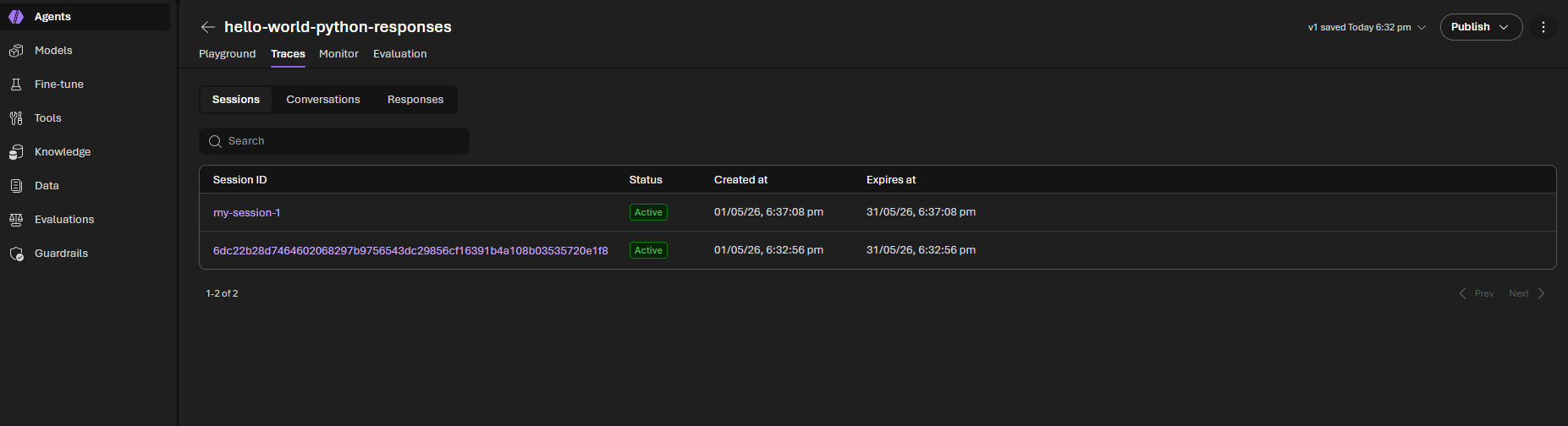
You will notice here that the session ID was assigned by the Foundry platform. You can also supply a custom session ID by using the --session-id flag.
❯ azd ai agent invoke "What is Github Copilot?" --session-id "my-session-1"
Agent:        hello-world-python-responses (remote)
Message:      "What is Github Copilot?"
Session:      my-session-1
Conversation: conv_dab13330c3fcbf5800mauQn5G3CawWK3CJZcd5qV82P6hQaVVC

Trace ID: ee7c5041-5cb5-4d66-b9e9-8f8791f91cc8
[hello-world-python-responses] GitHub Copilot is an AI-powered code completion tool developed by GitHub in collaboration with OpenAI. It uses machine learning models to assist developers by suggesting whole lines or blocks of code as they write, helping to speed up coding, reduce errors, and improve productivity. It supports multiple programming languages and integrates directly into popular code editors like Visual Studio Code.
You will find both these sessions visible in the Foundry Portal for your agent.
View Agent logs
azd ai agent monitor
Run the above command to stream logs from the current session. You can pass in a custom session ID via the --session-id flag to view the log stream from that session.
Endpoints exposed by Responses protocol SDK
Only POST /responses endpoint requires handler implementation, the Responses protocol SDK internally implements all other endpoints:
| Method | Path | Summary |
|---|---|---|
POST |
/responses |
Create a new response |
GET |
/responses/{id} |
Retrieve response (JSON snapshot) |
GET |
/responses/{id}?stream=true |
SSE event replay (background+streaming only) |
POST |
/responses/{id}/cancel |
Cancel a background response |
DELETE |
/responses/{id} |
Delete a stored response |
GET |
/responses/{id}/input_items |
List input items (paginated) |
The Same Agent — Invocations Protocol
Now let’s see the same agent using the Invocations protocol. In a new folder, run
azd ai agent init -m https://github.com/microsoft-foundry/foundry-samples/blob/main/samples/python/hosted-agents/bring-your-own/invocations/hello-world/agent.manifest.yaml
The agent.yaml changes to declare the invocations protocol:
kind: hosted
name: hello-world-python-invocations
protocols:
  - protocol: invocations
    version: 1.0.0
resources:
  cpu: "0.25"
  memory: 0.5Gi
And here’s main.py —
app = InvocationAgentServerHost()

_history: list[dict[str, str]] = []


@app.invoke_handler
async def handle_invoke(request: Request):
    """Handle a streaming multi-turn chat request."""
    body = await request.body()
    if not body:
        raise ValueError("empty body")
    try:
        data = json.loads(body)
    except json.JSONDecodeError:
        user_message = body.decode("utf-8", errors="replace").strip()
    else:
        if isinstance(data, dict):
            user_message = data.get("message") or data.get("input") or ""
        else:
            user_message = body.decode("utf-8", errors="replace").strip()
    if not isinstance(user_message, str) or not user_message.strip():
        raise ValueError("missing message text")

    session_id = request.state.session_id
    invocation_id = request.state.invocation_id

    # Retrieve or create conversation history for this session
    _history.append({"role": "user", "content": user_message})

    async def event_generator():
        full_reply = ""
        for event in _responses_client.create(
            model=_model,
            instructions="You are a helpful AI assistant.",
            input=list(_history),
            store=False,
            stream=True,
        ):
            if event.type == "response.output_text.delta":
                full_reply += event.delta
                yield f"data: {json.dumps({'type': 'token', 'content': event.delta})}\n\n"

        yield f"data: {json.dumps({'type': 'done', 'full_text': full_reply})}\n\n"
        _history.append({"role": "assistant", "content": full_reply})

    return StreamingResponse(
        event_generator(),
        media_type="text/event-stream",
        headers={"Cache-Control": "no-cache"},
    )


app.run()
Let’s break it down:
InvocationAgentServerHostis the Invocations protocol SDK. It handles the HTTP server on port 8088, health checks, OpenTelemetry tracing, and the/invocationscontract.@app.invoke_handleris where you plug in your logic. The SDK calls this for every incoming request to/invocations.- The schema of the request and response is entirely up to you. In this sample, we showcase how to accept both a plain text string or a JSON object with either a
messageorinputfield. You can define your own schema and parse it as needed. - Because the Invocations protocol does not define a fixed schema, the platform does not store conversation history by default. You will need to manage storing the conversation history yourself.
Endpoints exposed by Invocations protocol SDK
Contrary to the Responses protocol, the Invocations protocol SDK requires you to write explicit handlers for all endpoints. The Invocations protocol exposes an optional OpenAPI spec endpoint at /invocations/docs/openapi.json which you can use to expose the contract of your agent to the world.
| Method | Route | Required | Summary |
|---|---|---|---|
POST |
/invocations |
Yes | Execute the agent. Handler - invoke_handler |
GET |
/invocations/{invocation_id} |
No | Retrieve invocation status or result. Handler - get_invocation_handler |
POST |
/invocations/{invocation_id}/cancel |
No | Cancel a running invocation. Handler - cancel_invocation_handler |
GET |
/invocations/docs/openapi.json |
No | Serve OpenAPI 3.x spec for the agent’s contract. Pass it to InvocationAgentServerHost(openapi_spec={...}) |
Both Protocols in One Agent
Here’s something that surprises a lot of people: you can expose both protocols from a single agent.
kind: hosted
name: my-dual-protocol-agent
protocols:
  - protocol: responses
    version: 1.0.0
  - protocol: invocations
    version: 1.0.0
resources:
  cpu: '0.25'
  memory: '0.5Gi'
The Responses endpoint serves at /responses and Invocations at /invocations — both active on the same container. This is useful when you want the convenience of Responses for conversational use cases (and the free Teams/A2A integration) while also exposing a custom Invocations endpoint for specialized payloads or integrations.
Conclusion
We covered a lot of ground in this post. Here’s the recap:
- Hosted agents let you run your own code in a managed sandbox — you focus on agent logic, the platform handles infrastructure.
- The Responses protocol gives you OpenAI-compatible conversation management, streaming, and Teams/A2A integration with minimal code.
- The Invocations protocol gives you full control over payloads and streaming at the cost of more code.
- The SDK stack ranges from the high-level Agent Framework down to raw Responses/Invocations SDKs for BYO scenarios.
- Both protocols can coexist in a single agent.
In the next posts in this series, we’ll dive into sessions and state management, agent identity and security, tool integration, and multi-agent architectures. There’s a lot more to explore.